
Le Monde, Live News
Le MondeNews & Magazines
3.8702.00 Reviews
- Version
- Varies With Device
- Installs
- 5.00M
- Age Rating
- Everyone 10+
Screenshots



Our Review of Le Monde, Live News
 Analysis by Appyee
If you're a news junkie like me, you probably want to keep up with what's happening around the world as quickly and accurately as possible. That's where the Le Monde, Live News app comes into play. I've spent some time exploring this app, and I'm here to spill the beans on my experience.
What to expect from this English-language news app
Le Monde is a free news and magazines app from Le Monde, aimed at readers who want an English-language route into current events and international coverage. Its name may be familiar from the French newspaper, but this app’s store summary positions it for people following breaking news and world events in English. That makes it worth considering if you want a regular news read without having to start in French.
The app has a 4.0 average from around 115,000 ratings and more than five million installs. Those figures suggest it has found a broad audience, though popularity alone does not tell me whether its coverage suits every reader. Its audience rating is Everyone 10+, and the app is free to install, with in-app purchases ranging from $0.99 to $294.99 per item. I would treat the free download as a chance to see how the app fits your routine, not as a guarantee that every article or feature will be available without payment.
For a first-time reader, the main question is less “Can I open it?” and more “Does this give me the kind of news I want to spend time with?” I’d start with a specific interest—an international story, a political development, or a cultural subject—and see whether the reporting and presentation make it easier to understand the issue. That is a more useful test than judging a news app by its headline screen alone.
Getting Started with Le Monde, Live News
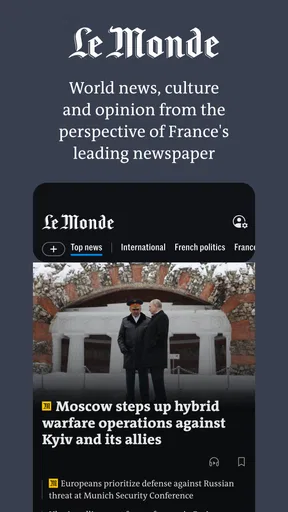
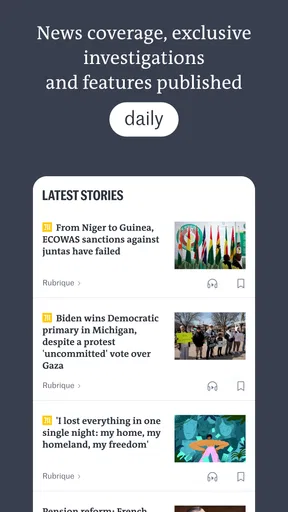
First things first, downloading the Le Monde, Live News app is a breeze. Available on both Android and iOS, you can find it easily on Google Play or the App Store. Once installed, the app greets you with a clean and straightforward interface. I was quite impressed with how intuitive it feels. No unnecessary clutter – just the news you want at your fingertips.
First setup: make the news feed work for you
Rather than trying to follow everything from the start, I recommend choosing a narrow purpose for your first visit. You might want a quick sense of the day’s major developments, or you may be looking for reporting that gives a complicated international story more context. Keep that goal in mind as you explore. It helps you decide whether the app’s English-language coverage is a good match, instead of getting lost in a long scroll of headlines.
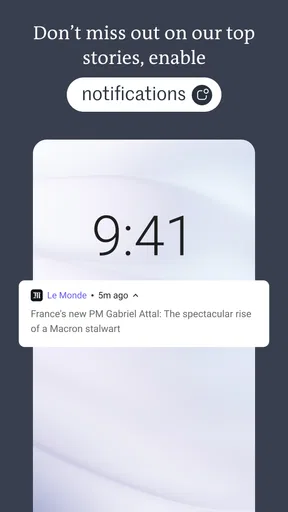
Notifications deserve a little thought before you enable them broadly. If you want alerts only when a story changes in a meaningful way, keep the settings selective and adjust them after you see how often they interrupt you. If you mainly read at a set time, you may prefer to open the app deliberately rather than let breaking-news alerts shape your attention throughout the day. The practical trade-off is simple: alerts can make you quicker to notice a developing event, but too many can turn useful updates into background noise.
For a first session, I’d also decide whether you are browsing casually or checking a particular subject. A reader who opens a news app between meetings has different needs from someone settling in for a longer read at home. Starting with that distinction makes it easier to judge the app’s pace and article depth, and to avoid mistaking a busy news day for the normal experience.
Design and User Experience
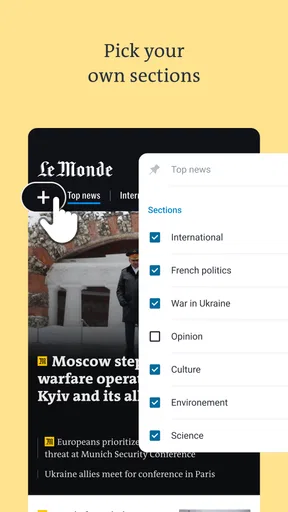
Let’s talk about the design for a moment. The app sports a minimalist look, which is just my cup of tea. It’s easy on the eyes, especially when you're scrolling through headlines. The navigation is seamless, with tabs that categorize news into sections like politics, economy, culture, and more. I found it super easy to switch between different categories, which is perfect for someone like me who has a wide range of interests.
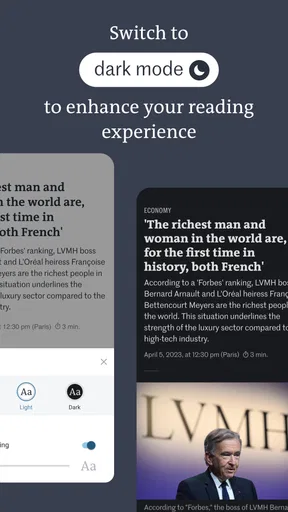
One thing I love is the dark mode option. As someone who often checks the news late at night, this feature is a lifesaver for my eyes. Plus, it just looks cool, right?
Your first meaningful read
My suggested first success is not simply opening the app and scanning the top headlines. Pick one story you already have questions about, read beyond its headline, and then look at the surrounding coverage in the relevant section. That gives you a clearer feel for whether the app helps you understand what happened, why it matters, and what might still be unfolding. It also shows whether the writing style works for you when you have more than a minute to spare.
A realistic routine might be checking the app over breakfast, saving an article for a commute, then returning to it when you have a stable connection or a quiet moment. On a busy day, I would use the headline view as a quick orientation, not as a substitute for reading the full reporting. The useful habit is to separate “I’ve seen the alert” from “I understand the story”; that small pause helps keep a fast-moving news feed from creating a false sense of certainty.
Content Quality and Variety
The heart of any news app, of course, is its content. Le Monde does not disappoint. The articles are well-written, detailed, and provide a nuanced view of the issues. I appreciate the depth of the reporting – you’re not just getting the headlines but the full story and analysis. For someone who loves to dive deep into topics, this is a huge plus.
Moreover, the variety is impressive. You can find everything from breaking news to in-depth features and opinion pieces. There’s also a good mix of global and local news, which keeps things balanced.
Who will get the most from it
I think this app is best suited to readers who want more than a quick stream of short headlines, especially people interested in international affairs and those who like to follow a story as it develops. Its English-language focus can be useful for readers who want to engage with Le Monde’s coverage without needing to read French. It can also serve as a considered second source when a major event is dominating social feeds and you want a fuller article rather than a string of reactions.
It may be less suitable if you only want a frictionless, all-free headline aggregator, if your priority is narrowly local reporting, or if you prefer news delivered in a language other than English. People who want a single quick summary and rarely open full articles may not get enough value from a publication-oriented app. In those cases, a general news aggregator can be more convenient, while a local outlet may be a better choice for neighborhood-level updates.
Live Updates and Notifications
One of the standout features is the live updates. I mean, who doesn't want to be in the know as things happen? The app delivers real-time updates, and you can customize notifications based on your interests. This means I get alerts on the stuff I care about without my phone buzzing incessantly for every news story out there.
However, a word of advice: make sure to tweak these settings, or you might find yourself overwhelmed with notifications.
Live coverage is most helpful when the story is genuinely developing and you want changes as they happen. For a slower-moving topic, repeated checks can be tiring and may not add much beyond a well-written article. I’d use alerts for events I actively need to track, then return to longer pieces for context. That division lets the app serve both immediate awareness and more deliberate reading without treating every notification as equally important.
Common confusion: free to install is not the same as all-access
One point that can surprise a new reader is the difference between downloading the app for free and having unrestricted access to its journalism. The app includes in-app purchases, so check what is available to you as you browse and read any purchase details carefully before confirming. I would not assume that every article, audio item, or other part of the experience is included just because the installation costs nothing.
If a payment prompt appears, pause and decide whether you have reached a one-off purchase or an option that suits your longer-term reading. The listed purchase range runs from $0.99 to $294.99 per item, so the amount can vary substantially. That is a good reason to read the screen closely rather than tapping through quickly. I would also avoid building a daily routine around paid access until you know what you personally read and how often.
For someone comparing it with a free aggregator, the distinction is important: an aggregator’s main appeal is collecting headlines from different publishers in one place, while a publication’s app is more about reading that publisher’s journalism and following its editorial coverage. Neither approach is automatically better. If breadth and quick scanning matter most, an aggregator may suit you; if you want to spend time with Le Monde’s reporting in English, this app has a clearer purpose.
Offline Reading and Additional Features
Another feature I find particularly useful is offline reading. Whether I'm commuting or just in an area with spotty internet, I can download articles to read later. This is a big win for someone like me who’s always on the move.
The app also offers some cool additional features. There's a section for video content, which adds a multimedia dimension to the news. You can also access podcasts directly from the app, which is perfect for when I'm multitasking – like catching up on world events while cooking dinner.
For a commute, I’d prepare by choosing what I want to read before the connection becomes unreliable rather than expecting to browse freely offline. That small workflow matters: select a piece while online, then treat the saved reading as a focused queue for later. It is especially useful when you want to use a short stretch of downtime well, though it will not replace live updates when you need the latest developments.
Video and podcasts give you other ways into the news, but I would choose them based on the moment rather than trying to consume every format. A podcast can fit chores or a walk; an article is easier when you want to check a detail or move at your own pace. If you need to remember specifics, reading is usually the more practical option. If your hands are busy and you want a broad update, audio can be a better fit.
How it compares with other ways to follow the news
Compared with a general-purpose news feed, Le Monde’s app feels more like a destination for readers who are willing to spend time with a publication’s own coverage. An aggregator can be better for scanning many outlets side by side, particularly when you want a broad mix in one session. A social feed can surface events quickly, but it also mixes reporting with commentary and posts that may lack context. I prefer using this app when I want to move from a headline toward a fuller account, then checking another source when I need a contrasting perspective.
It is also not necessarily the right replacement for a specialist source. If you need detailed information about a local council, a particular industry, or a niche subject, a dedicated publication may go deeper. I see Le Monde as most useful for a general reader who values international reporting and explanatory depth, rather than as a universal answer to every information need.
Subscription and Pricing
Now, let’s talk about the elephant in the room – subscription and pricing. While the app is free to download, accessing all the content requires a subscription. It’s worth noting that the pricing is competitive with other major news sources, and there’s often a free trial available.
As someone who values quality journalism, I think it's a fair trade-off, but it might not be for everyone. If you’re unsure, I’d recommend taking advantage of the trial before committing.
Because the purchase options can differ, I would make the decision based on your own reading pattern rather than on the assumption that a subscription always pays off. If you read full articles regularly, value the reporting, and return to the app across the week, paid access may feel worthwhile. If you only open it when a major story breaks, you may prefer to keep it as an occasional source and use other outlets for everyday headlines.
Next step: build a small, sustainable reading habit
After trying the app, I’d keep the routine simple: check the main coverage when it fits your day, follow only the subjects you truly care about, and save offline reading for planned moments without reliable internet. If notifications start to intrude, narrow them instead of abandoning the app outright. A news habit should help you feel informed, not keep you on alert all day.
Before deciding whether to keep it, ask yourself three practical questions: Did the English-language reporting give you useful context? Did you find yourself opening full stories rather than just skimming alerts? And did the available access fit the way you actually read? Your answers will tell you more than a quick tour of the interface.
Final Thoughts
All in all, the Le Monde, Live News app offers a comprehensive and user-friendly way to stay informed. From its sleek design to the depth of its content, it checks a lot of boxes for me. Whether you’re a casual reader or a news enthusiast, there’s a lot to love here.
If you’re looking for a news app that combines quality journalism with a great user experience, give Le Monde a try. You might just find it becomes your go-to source for staying connected with the world.
Verdict
Strengths of Le Monde, Live News
- Comprehensive global news coverage.
- User-friendly interface and navigation.
- Real-time updates keep you informed.
- Customizable notifications for breaking news.
- Offline reading mode available.
Limitations of Le Monde, Live News
- Subscription required for full access.
- Ads can be intrusive at times.
- Limited multimedia content options.
- Occasional app performance issues.
- Some articles have paywalls.
Similar Picks in This Category
View All
Google News - Daily Headlines
Google LLC4.0

X
X Corp.4.8

Flipboard:Your Social Magazine
Flipboard3.4

Opera News: breaking & local
Opera4.5

Hindi News by Dainik Bhaskar
Dainik Bhaskar Group4.0

Way2News Daily News App
Way2News ( Formerly Way2SMS )4.6
Frequently Asked Questions
What is Le Monde, Live News app?
Le Monde, Live News app is a mobile application that delivers up-to-date news from around the world. It provides users with real-time updates, in-depth articles, and multimedia content from Le Monde, a leading French newspaper. The app is designed for those who want to stay informed about global events and offers content in multiple languages.
Is Le Monde, Live News app free to use?
While the Le Monde, Live News app is free to download, it operates on a freemium model. Users can access a limited number of articles for free, but a subscription is required for full access to all content, including exclusive stories and ad-free browsing. Subscription options vary and can be purchased directly through the app.
What features does Le Monde, Live News app offer?
The app offers a wide range of features including breaking news alerts, personalized content recommendations, and offline reading. Users can also enjoy multimedia elements like videos and podcasts, save articles for later, and share stories across social media platforms. The interface is user-friendly, making it easy to navigate and customize.
Can I customize the news topics in Le Monde, Live News app?
Yes, the app allows users to customize their news feed according to their interests. You can select your preferred topics such as politics, culture, economy, and more. This personalization ensures that you receive news that is most relevant to you, enhancing the overall user experience by tailoring content to your preferences.
Is Le Monde, Live News app available on all devices?
Le Monde, Live News app is available for both Android and iOS devices. It can be downloaded from the Google Play Store for Android users and the App Store for iOS users. The app is optimized for both smartphones and tablets, ensuring a seamless experience across all devices.
